
Help Center / Safety and support
Contact support
Written by the SMMFollows support team. Updated 2026-11-01.
Support runs around the clock, in English, through tickets. Most answers come back within hours; order investigations can take longer because we check the delivery log first.
Open a ticket
- Sign in and open Tickets in the left menu.
- Pick the category: Orders (then Refill, Cancellation or Speed Up), Payments, Invoice, Child Panel, API, Bug, Redeem, Request (to ask for a service we don't list) or Other. The category routes the ticket to the right person, so a payment question filed under Orders waits longer.
- For order tickets, paste the order IDs, comma-separated. Write what happened, and include the details below.
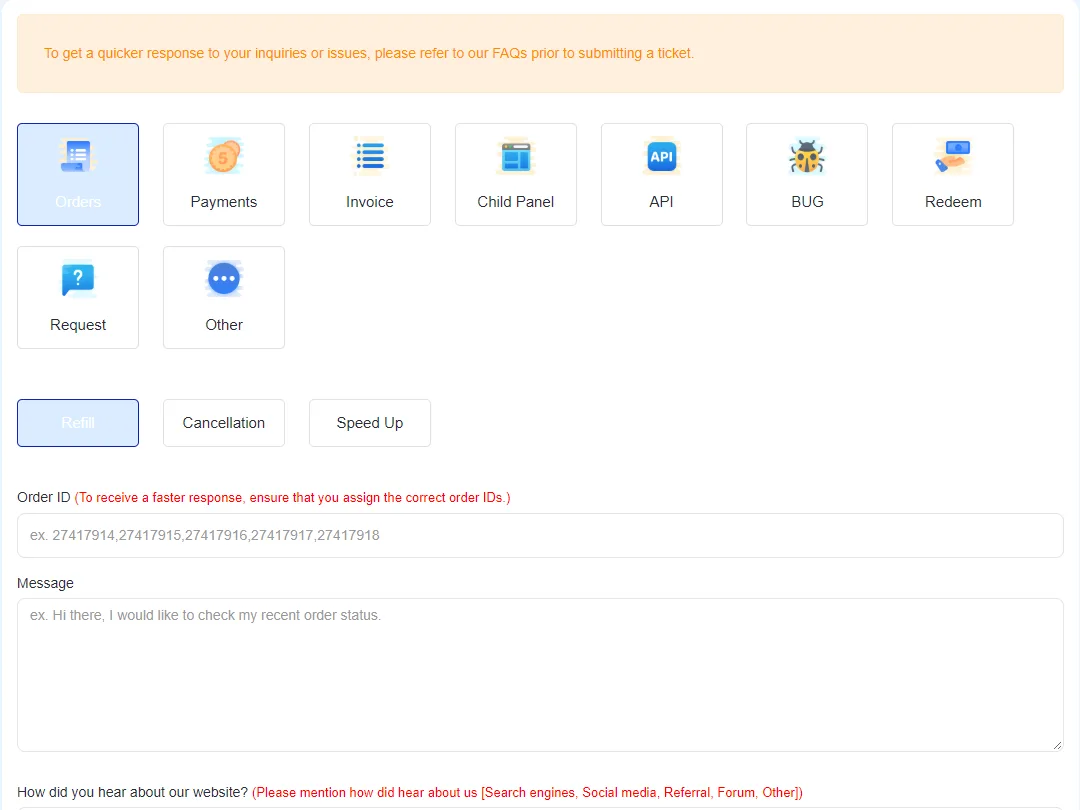
Tickets are tied to your account, so we can see your orders and payments without asking. That's why they're faster than email. Your past tickets and their status (Answered, Closed) are listed next to the form.
contact@smmfollows.com, for anything you can't put in a ticket, including reports of sites using our name. Mention your username if you have an account.
What to include
| Topic | Include |
|---|---|
| Order | Order ID, and what you've already checked (public page, correct link, start time) |
| Payment | Method, amount, date and time, transaction or reference ID |
| Refill | Order ID and a screenshot of the current count |
| API | The action, the parameters you sent (without the key), and the exact response |
| Child panel | Your panel's domain and what you need changed |
What we can't do
- See or fix accounts on other websites, including ones that use our name.
- Refund to a card or PayPal; refunds go to your balance.
- Tell you which specific accounts followed or liked a page.
One ticket per issue, please. Replying to your open ticket keeps the history together and gets you answered sooner than opening a new one.
Didn't find what you needed? Open a ticket from your account and include the order ID if there is one. We reply around the clock.