
Help Center / Earn with SMMFollows
Child panel: your own SMM panel
Written by the SMMFollows support team. Updated 2026-11-01.
A child panel is a complete SMM panel website, on a domain you own, that we host and that is connected to SMMFollows as its provider. Your customers order on your site under your brand; the orders are forwarded to us through your account.
Price
$3 per month during the current promotion (the regular price is $5). The fee is deducted from your SMMFollows balance. It covers the panel only; the services your customers order are charged to your balance at our normal rates, and you set your own selling prices.
What you need
- A domain name. Any registrar.
- No hosting. We run the panel.
- Some balance, for the monthly fee and for the orders your customers will place.
Setting it up
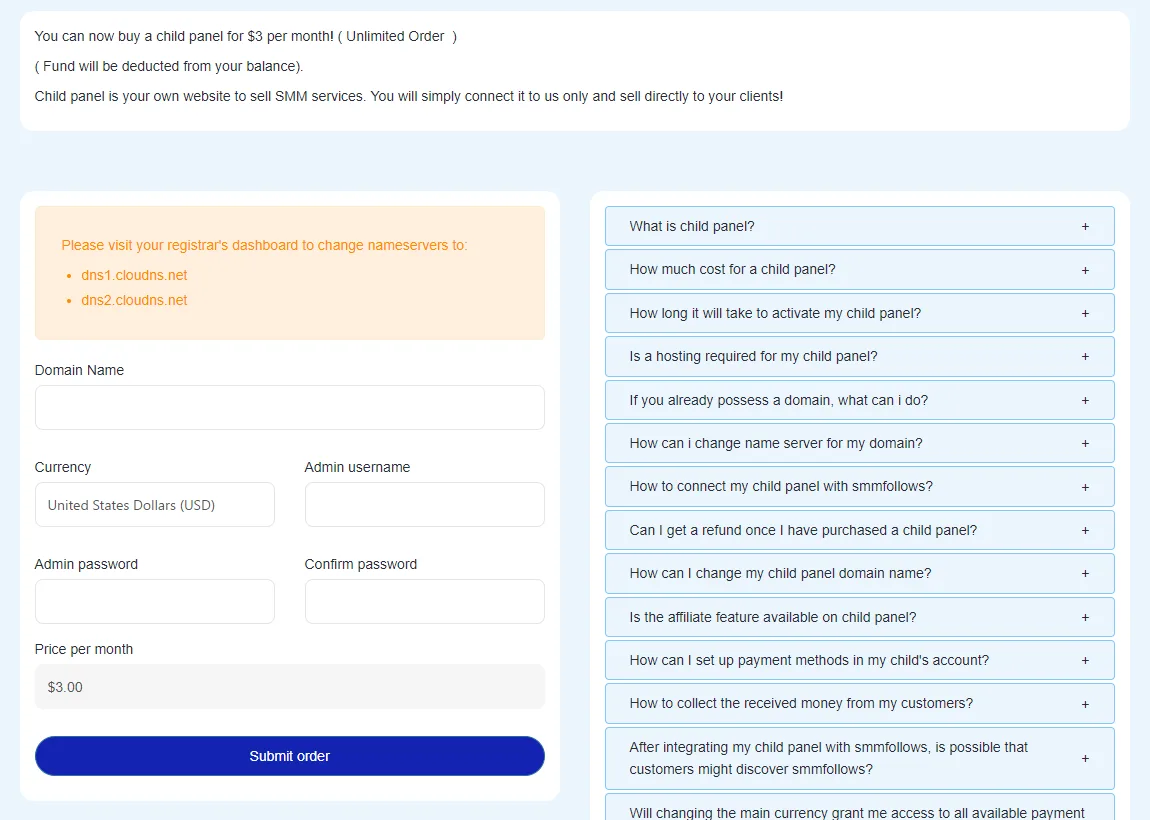
- At your registrar, change the domain's nameservers to the two shown on the Child panel page of your account, currently
dns1.cloudns.netanddns2.cloudns.net. Use what the page shows if it ever differs from this article. - On that page, enter the domain, choose the currency (USD unlocks the full list of payment gateways) and set the admin username and password.
- Submit. The panel is activated within 3 to 6 hours once the nameservers have propagated.
- Sign in to
yourdomain.com/admin. Under Settings → Providers, add SMMFollows with your API key, then import the services you want to sell. - Under Settings → Payments, add your own payment methods. Customers pay you directly; the money never passes through us.
Things people ask
- Will customers see SMMFollows? No. Orders are forwarded in the background.
- Can I change the domain later? Once. Update the new domain's nameservers and send it to us in a ticket.
- Can I add a second admin? Yes, by ticket. Tell us the username, password and whether the account should have full access or only certain pages (orders, tickets, payments).
- Refunds? Not once the panel is active. You can stop it any time by ticket.
- Affiliate program? Not inside the child panel.
More detail, with a comparison to running your own script, is on smmfollows.pro.
Didn't find what you needed? Open a ticket from your account and include the order ID if there is one. We reply around the clock.