
Help Center / Refills and cancels
Request a refill
Written by the SMMFollows support team. Updated 2026-11-01.
Refills restore units that were delivered and later dropped. They are free on services that include refill, within the period stated in the service description.
Before you request
- Open the service on the Services page and confirm it has a refill period ("Refill: 30 days", for example). A service without one can't be refilled.
- Check that the order is Completed or Partial, and that you're still inside the period, counted from completion.
- Make sure the count actually dropped below what was delivered. Compare the current count with start count plus delivered quantity.
Requesting it
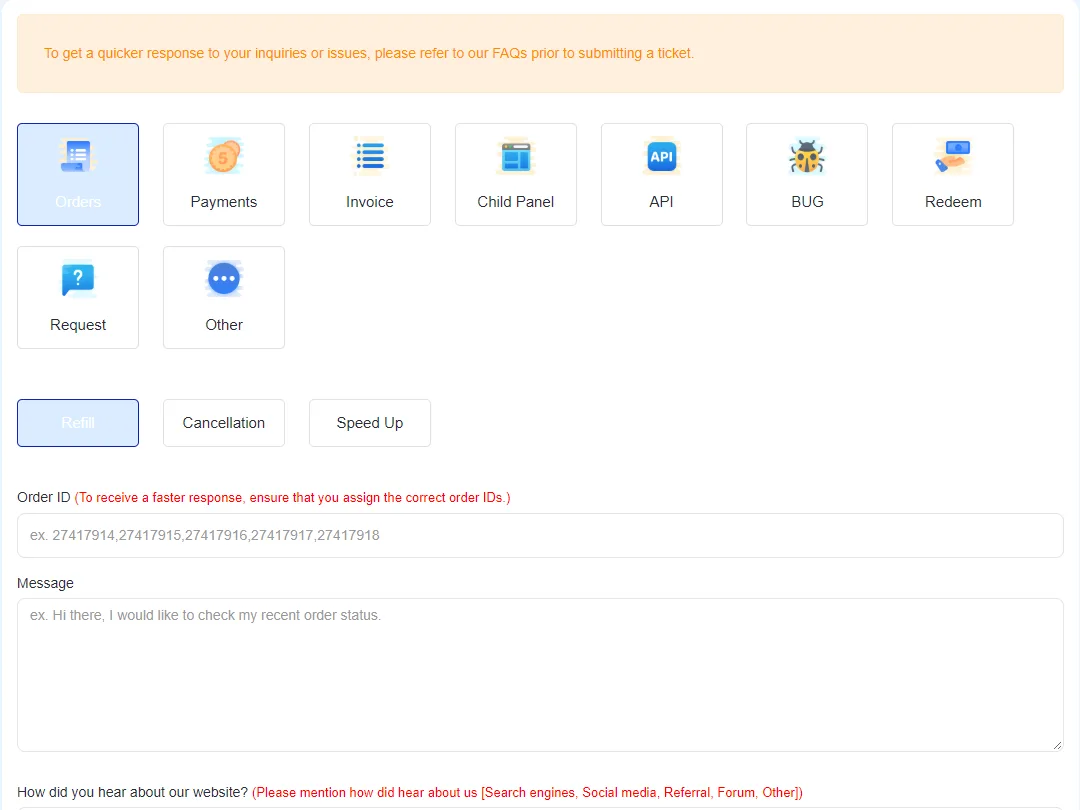
- Open Tickets in the left menu.
- Choose the Orders category, then Refill.
- Paste the order ID. Several orders can go in one ticket, separated by commas (
27417914,27417915). Wrong IDs are the main reason refill tickets take longer, so copy them from the Orders page rather than typing them. - Add a short message and submit. The refill is started on our side and you get an answer in the ticket.
Through the API, the same thing is action=refill, and you can follow it with refill_status.
Why a request is rejected
- The refill period is over.
- The count didn't drop, or dropped less than the platform's normal fluctuation.
- The page is private or the post is gone, so there's nothing to refill onto.
- A refill for the same order is already running.
If a refill was rejected and you think it shouldn't have been, open a ticket with the order ID and a screenshot of the current count.
Didn't find what you needed? Open a ticket from your account and include the order ID if there is one. We reply around the clock.