
Help Center / Placing orders
Place an order
Written by the SMMFollows support team. Updated 2026-11-01.
An order is one service applied to one link, for one quantity. Everything you need is on the New order form, which is also the page you land on after signing in.
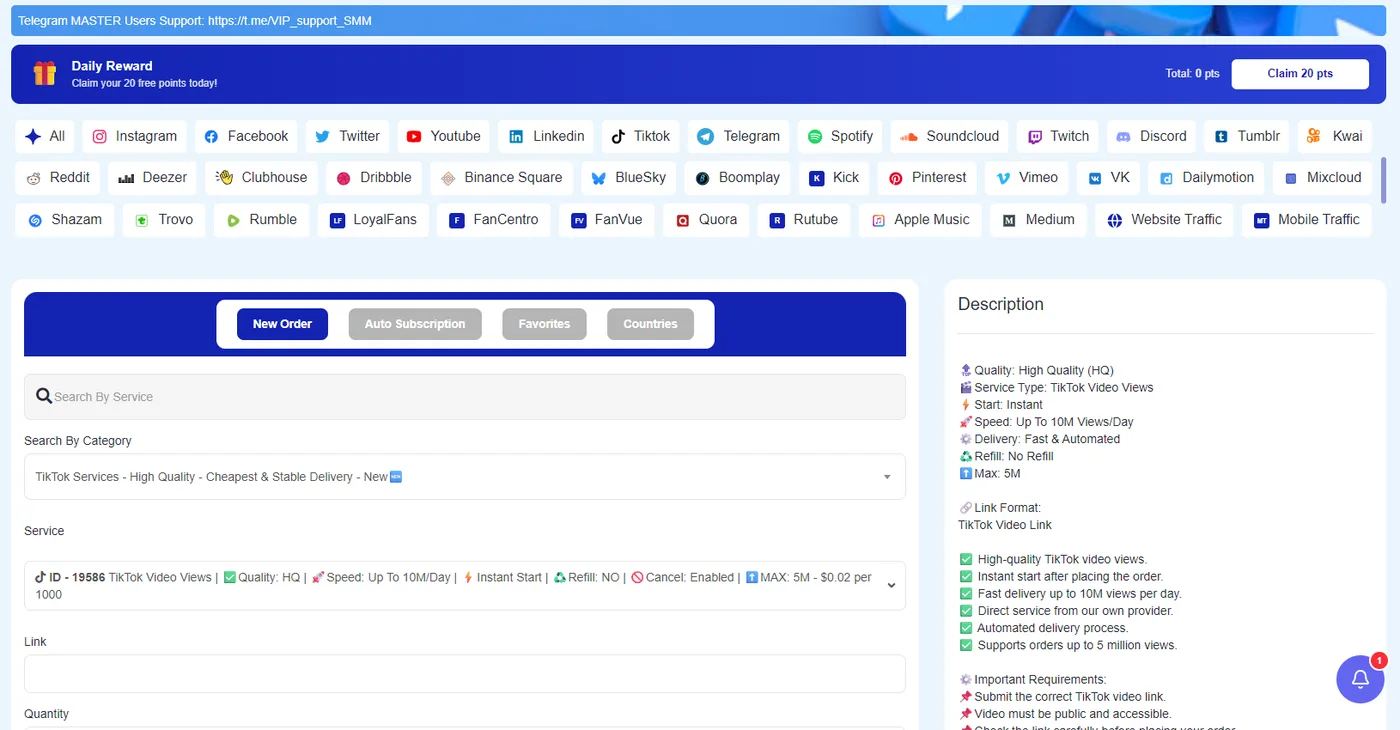
Steps
- Platform. The row of buttons at the top filters the categories by platform. There are around forty: Instagram, TikTok, YouTube, Facebook, X, Telegram, Spotify, Twitch, Discord, Kick, Pinterest, LinkedIn, Reddit, Threads-style newcomers like Bluesky, plus website and mobile traffic. Or type in Search by service if you know the service name or ID.
- Category and service. Pick the category, then the service. The price in the list is per 1,000 units. The star next to a service adds it to Favorites, a tab that saves you the hunt next time. The Countries tab shows services with geo-targeting.
- Read the description. It appears on the right as soon as you pick a service, in a fixed format: Quality, Service type, Start, Speed, Delivery, Refill, Max, and the Link format it expects (for example "TikTok video link"). Most failed orders come from skipping this step.
- Link. Paste the full URL of the profile, post or video. Details per platform are in which link to paste.
- Quantity. Stay between the minimum and maximum shown under the field. The charge is calculated as you type.
- Submit. The order appears on the Orders page, usually in Pending for a short while before moving to In progress.
Before you submit
- The account or post must be public while the order runs. If it's private, we can't deliver.
- Don't place a second order for the same link and service while the first one is still running. Wait for it to complete; some services refuse the duplicate, others deliver both and the counts overlap.
- Check that the link is the right one for the service: a "post likes" service wants a post URL, not a profile URL.
Many orders at once
If you have dozens of links, don't fill the form dozens of times. Use mass order. To spread one order over time, use drip-feed.
Didn't find what you needed? Open a ticket from your account and include the order ID if there is one. We reply around the clock.