
Help Center / Placing orders
Reading the Services page
Written by the SMMFollows support team. Updated 2026-11-01.
The Services page is the full catalog, grouped by platform and category. It's where you compare options before ordering, and where the service IDs for mass orders and the API live.
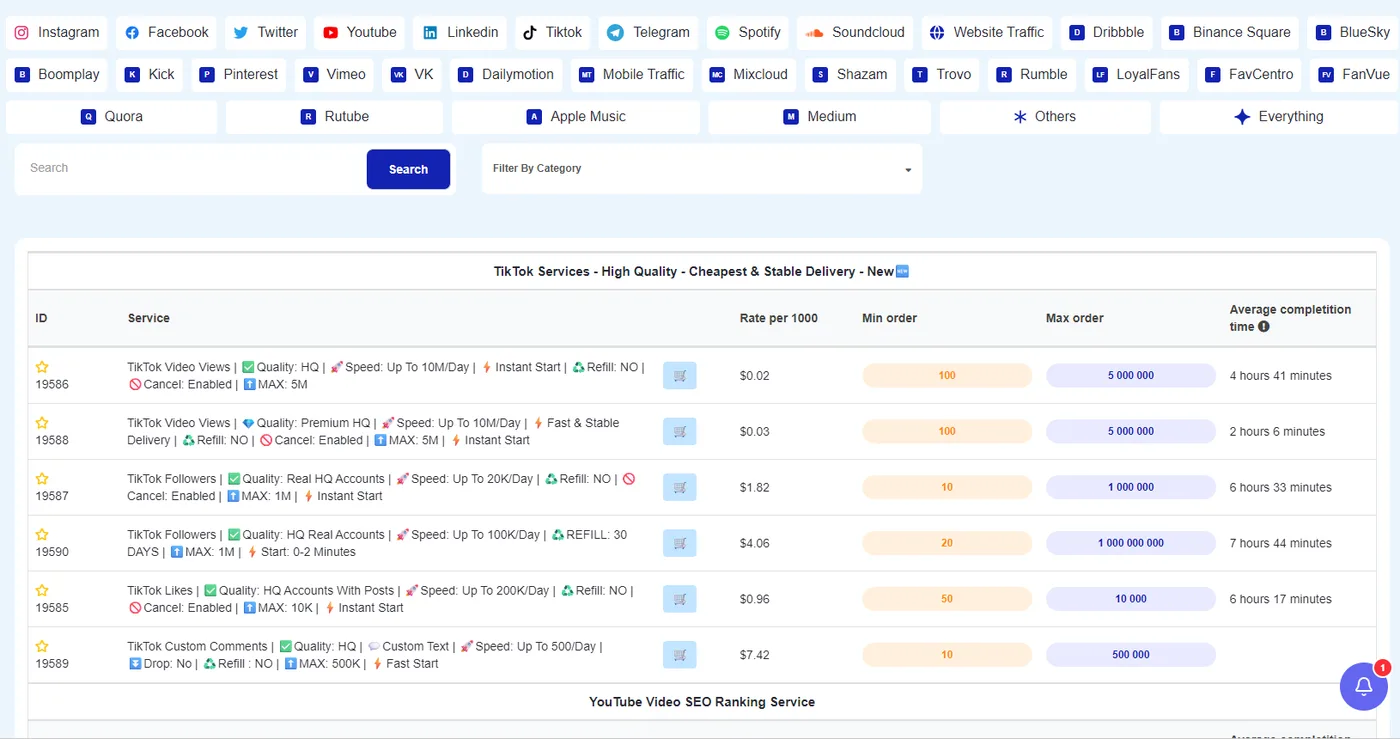
The columns
| Column | What it tells you |
|---|---|
| ID | The service number. Use it in mass orders and the API. The star above it adds the service to your Favorites. |
| Service | The name, followed by tags: Quality, Speed, Start, Refill, Drop, Cancel, Max. Read them as a contract. "Refill: NO" with "Drop: possible" is a cheap service for volume; "Refill: 30 days" or "Lifetime guaranteed" costs more and is for accounts you care about. |
| Rate per 1000 | Price for 1,000 units. A 5,000 order on a $0.02 service costs $0.10. |
| Min order, Max order | The smallest and largest quantity accepted per order. |
| Average completion time | Measured from real orders on that service recently, for example "4 hours 41 minutes". It's the best single number for "how long will it take", better than the speed in the name, because it includes the start delay. |
Picking between similar services
Most categories have several near-identical entries, like two "TikTok Video Views" at $0.02 and $0.03. The difference is in the tags: quality tier, speed, and whether cancel or refill is allowed. If you resell, test both with a small order and watch the count a week later before choosing which one to list.
The cart icon on each row jumps straight to the New order form with that service selected.
Searching
The search box at the top matches the service name and ID. The platform buttons filter the whole page; Everything shows all of it, Others the smaller platforms.
Didn't find what you needed? Open a ticket from your account and include the order ID if there is one. We reply around the clock.